Review your dance practice in SportsDraw.
SportsDraw lets you slow a dance phrase down, step frame by frame through a transition, turn on body tracking, mark a position and compare two takes side by side, all on your iPhone or iPad for $9.99 once.
What SportsDraw does for a dancer
Record your practice in the app or import it from Photos, then review it the way a teacher would: find the count, look at the shape, and compare it with your last take. Clips stay on your device, with no account, subscription or ads.
The tools you will use
| Tool | What it does for a dance clip |
|---|---|
| Slow playback and frame stepping | Play a phrase at half or quarter speed, then step one frame at a time through a turn, jump or transition. |
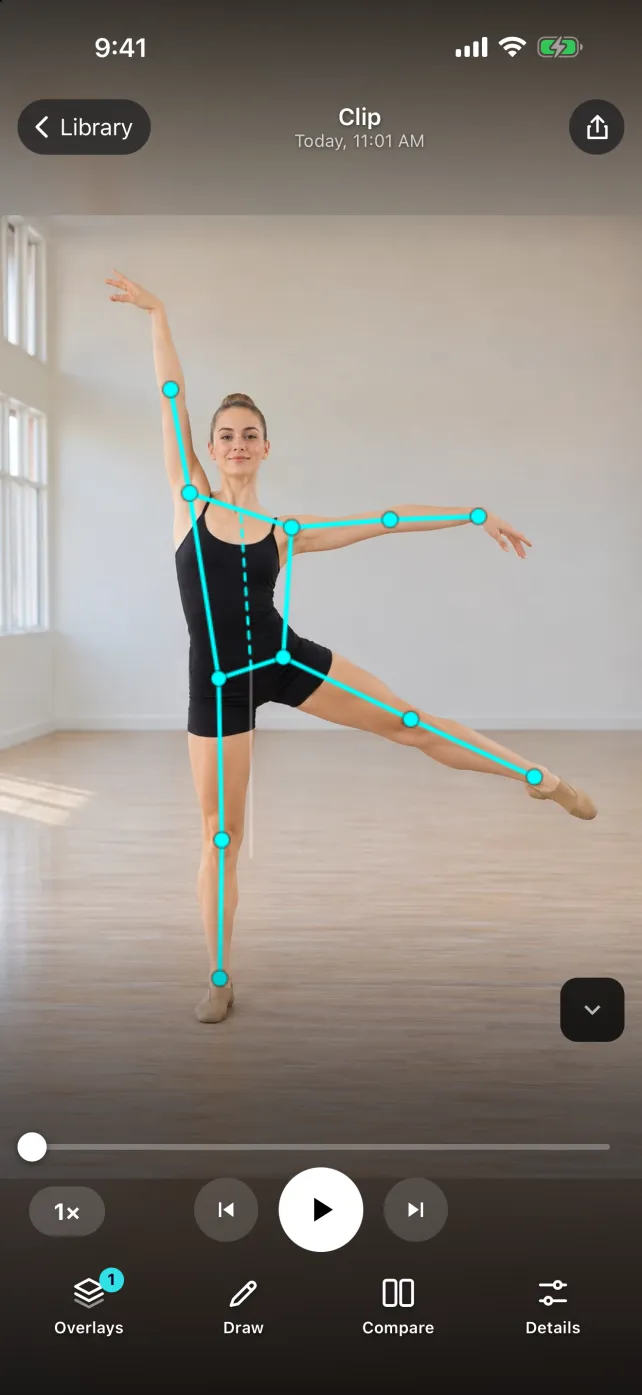
| Body tracking and joint angles | Turn on on-device body tracking to draw a skeleton over the dancer frame by frame, with joint angles. |
| Drawing tools | Mark a position with lines, circles, arrows and angles you can move after placing them. |
| Side-by-side or stacked comparison | Put two takes next to each other or stacked, and pause each one at the same count. |
| Hands-free recording | Start recording with a 3, 5 or 10 second delay, the volume buttons, Camera Control or a Bluetooth remote, so you can film yourself. |
| Notes, voice notes and tags | Keep the count, the orientation and your teacher’s cue with the clip, in a private library on your device. |
| Sharing | Export an annotated photo or video through Messages, Mail or AirDrop. Your teacher does not need the app to watch it. |
A five-minute review of one phrase
- Direction: open the saved clip and check a known side. Note whether the view is mirrored before deciding that an arm or step is wrong.
- Same count: pause each take at the same visible event, such as the first clear step after the lead-in. You choose the matching frame in each clip.
- One mark: draw one line or circle on the position you mean, or turn on body tracking to see the line of an arm or leg.
- Full speed: watch the phrase again at normal speed with the original audio, so the observation still makes sense in the whole movement.
- Send it: export the marked frame or a short clip with one question for your teacher.
Reading the body-tracking overlay
The skeleton is an estimate drawn over the image. Turns, floorwork, loose clothing and overlapping dancers can confuse it, so check the original frame when a line looks wrong. It does not establish weight distribution, turnout, musical expression or safe technique; bring what you see to your teacher. SportsDraw is a manual review tool: you choose the matching moment in each take, and it does not line up music automatically or score a dance.
Price and availability
The current release is SportsDraw: Video Analysis 1.1.0, which works with any movement you can film. It is $9.99 once on the U.S. App Store, with every feature included and no subscription or in-app purchases. See SportsDraw on the App Store · Product facts.
For camera setup, use the dance filming plan and printable review card.
Keep the whole movement visible
Dance phrase review · Gymnastics routine filming · Figure skating practice review · All practice guides