Dance Practice Video Review: Compare the Same Phrase
Film your whole dance phrase, keep left and right consistent, and compare the same count. A free camera plan and printable rehearsal-review card.
Read the filming planA close-up of a spin or jump can omit the preparation and the exit a coach wants to discuss. Rink boards, glass and other skaters also limit what a phone can see. Start with a familiar sequence already planned with your coach, then decide whether the camera can retain the complete question.
Use a rink-approved position that gives a clear view of the planned practice area. Keep the skater’s whole body and surrounding ice visible through the entry, selected event and exit. Track smoothly only when a fixed view cannot retain the sequence, and note the camera movement when comparing recordings.
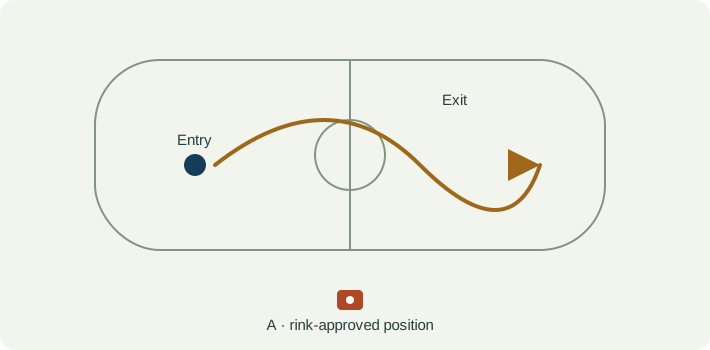
Ask the coach and rink where a recorder may stand and whether filming is allowed in that session. Stay clear of doors and circulation routes. Do not put a phone, tripod or operator onto active ice to get a closer picture. If the permitted view is blocked, keep that limitation rather than moving into skating traffic.
Test the intended framing from the approved location. Include the approach and enough ice beyond the selected event to retain the exit. Keep the skater large enough to identify visible positions while leaving headroom and room below the blades. A board, post, reflection or patch of glare can obscure the exact moment you intended to inspect.
A fixed wider view preserves a rink reference. If a designated recorder needs to follow a travelling sequence, use a smooth view and avoid sudden zooms. Record that choice in the note. Compare similar rink positions and framing; a moving camera cannot supply a fixed reference for measured travel or speed.
| Event | What to keep visible | Review question |
|---|---|---|
| Entry | The recognisable preparation and surrounding ice before the chosen event. | Did the two clips begin at the same part of the sequence? |
| Selected event | The whole body, with relevant hands, feet and ice contact visible where possible. | Which details are clear, and which disappear behind the body, boards or motion blur? |
| Exit | The movement away from the event and its continuation across the ice. | Does the clip retain the exit rather than stopping at the highlight? |
| Sequence context | Rink position, direction, camera movement and other skaters near the sequence. | Are the two attempts comparable, or did traffic and framing change the task? |
| Observation | Interpretation to check | Next useful action |
|---|---|---|
| The blades are not visible. | A body-position view may still be usable, but it cannot establish the hidden contact detail. | Keep blade or edge claims out of the note and ask the coach what view would be useful. |
| The skater seems faster in the second clip. | Panning, zoom, camera distance and recording speed can change apparent travel. | Use matched context and do not report measured speed from this comparison. |
| A rotation is blurred between frames. | The recording may not contain the detail needed for the proposed judgement. | Preserve the uncertainty; slow playback does not recreate missing captured moments. |
| The entry is outside the crop. | The selected event has lost its approach context. | Use the original wider clip or retain more of the sequence in the next working copy. |
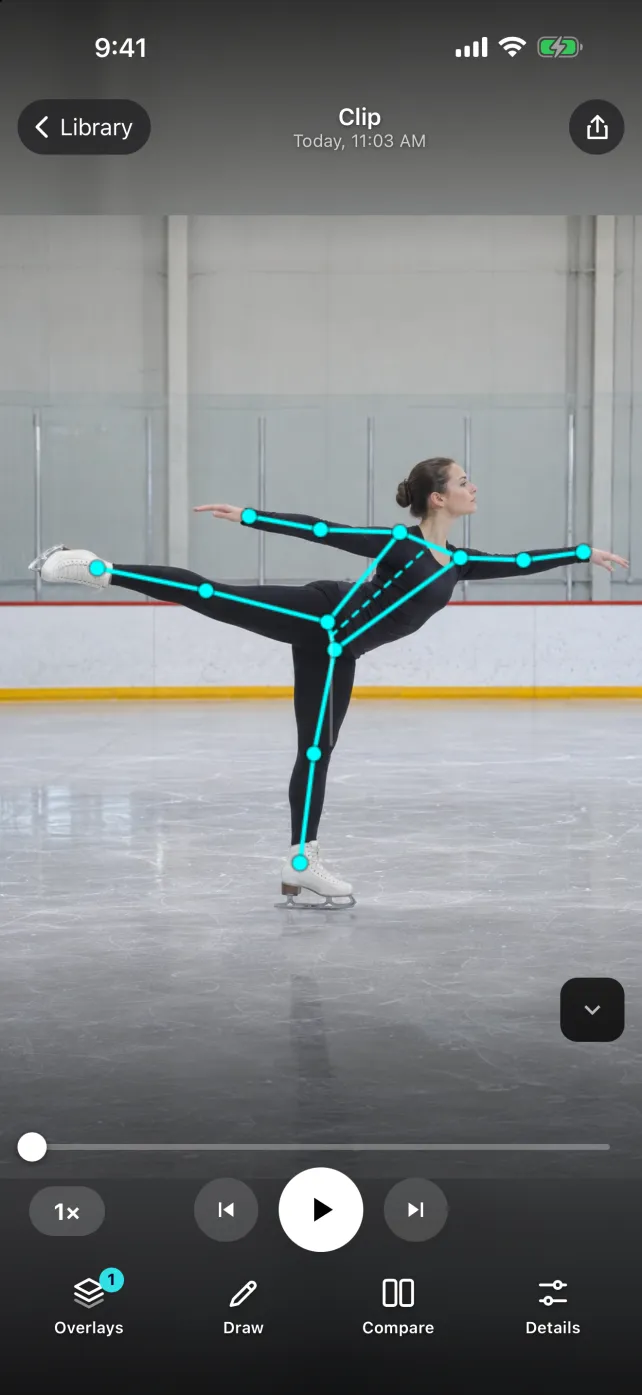
The SportsDraw player can support private clip review, slow playback, frame stepping, drawings, notes and manual side-by-side comparison. A visible body overlay can help point to the region being discussed, but its accuracy is not validated here for skating turns or jumps. SportsDraw does not identify figure-skating elements, assign grades of execution, certify rotations or replace a coach or judge.
See what SportsDraw can do · See SportsDraw on the App Store
A phone recording may not resolve blade edges, exact ice contact or a fast airborne position. Body overlays and drawn angles are two-dimensional visual aids, not official skating measurements. This article does not assess skill readiness or prescribe technique. Official test recordings have separate current requirements, including continuity and submission conditions; review copies and annotated exports should not be assumed eligible.
Slower playback does not add frames that the camera never recorded. If contact is hidden or falls between frames, preserve that uncertainty in your note. See frame timing explained.
https://sportsdraw.app/posts/figure-skating-practice-video-review
This worksheet stays in this page. Copy or print it to keep it; its contents are not sent to us.
Same familiar sequence and direction, recorded from the approved boards position. Both clips show the entry and exit, but a reflection hides the blade during the chosen event in take A. Observation: upper-body position is visible; blade contact is unknown. Ask the coach whether a different permitted view is useful next session.
This article is published by the app developer as a filming-and-review workflow. Camera diagrams and example notes are illustrative. They are not athlete test results or an individual coaching assessment. Coaching context was checked against the primary resources below on November 8, 2026.
Primary guidance for official virtual testing, a separate process from annotated private practice review. Consult the current handbook and test chair for actual test requirements.
A primary club example of the continuity and submission conditions that distinguish an official test recording from a short review clip. Club-specific instructions do not establish permission at another rink.
Film your whole dance phrase, keep left and right consistent, and compare the same count. A free camera plan and printable rehearsal-review card.
Read the filming planA camera plan for private gymnastics routine review: frame the full movement, preserve the approach and finish, and make a clear note for your coach.
Read the filming planAll sports video-review guides · Baseball and other practice articles