Pickleball video, frame by frame
Many soft-game mistakes happen in a fraction of a second at the kitchen line. SportsDraw lets you slow that moment down, trace the ball over the net and compare it with a better rep.
What SportsDraw does for pickleball
SportsDraw is an iPhone and iPad app for reviewing practice video. In pickleball it is most useful for the soft game: dinks, third shot drops and resets, where a small change in paddle contact or footwork decides whether the ball clears the net and lands in the kitchen. Players use it on their own drill sessions, partners film each other, and coaches use it during lessons to show a player what happened instead of describing it.
Where to put the camera
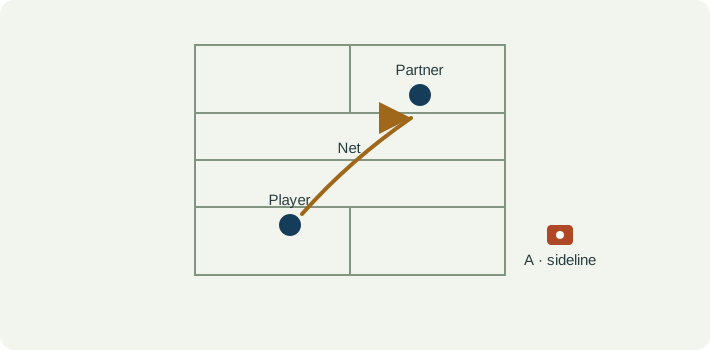
Keep the incoming bounce, paddle contact, the net and the landing area in one frame. Cutting the clip off at the paddle hides the result of the shot.
- Side-oblique view. Set the phone outside the sideline, about 10 to 15 feet back from the court and a little behind the player, with the lens around waist to net height. This shows paddle contact, the arc over the net and the next bounce.
- Baseline view. For serves, returns and drops, film from behind the baseline and clear of play so you can see depth and direction.
Make sure your partner does not stand between the lens and the contact point. The pickleball dink video guide covers framing and labeling in more detail.
How to review a dink in SportsDraw
- Record in the app with a 3, 5 or 10 second start delay, or start and stop with the volume buttons, Camera Control or a Bluetooth remote. Or import a clip from Photos, including Slo-mo at 120 or 240 fps.
- Play at half or quarter speed, then step frame by frame through the bounce and contact.
- Turn on ball tracking to trace the arc over the net.
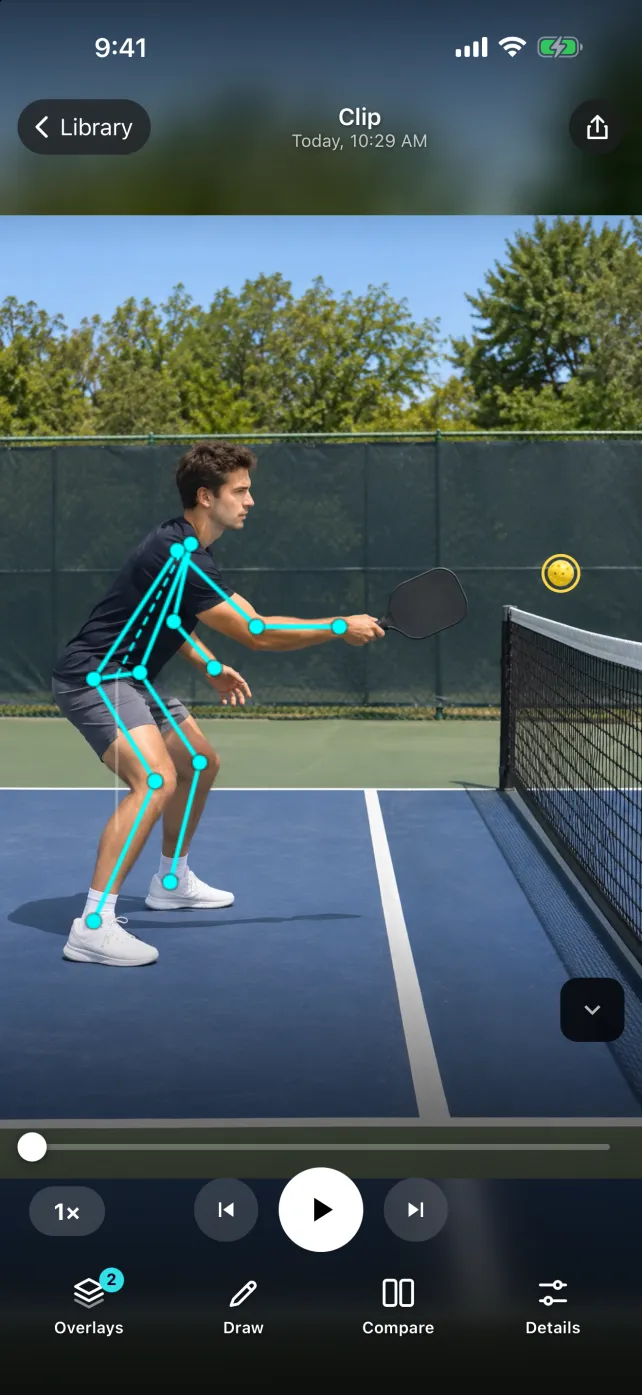
- Turn on body tracking for a skeleton overlay and joint angles.
- Draw a line along the net tape or a circle around your target.
- Compare two rallies side by side or stacked.
- Tag the clip (cross-court, backhand, drill) and add a note or voice note.
- Export a marked frame or clip through the share sheet.
Seeing the arc over the net
A dink or drop is all about height and shape. Ball tracking draws the visible path of the ball as a trail, and you can set how long the trail lasts. Pause near the top with a short trail to see the peak; a longer trail shows the whole flight from paddle to bounce. Put two clips side by side and you can see whether one dink floated higher or landed deeper.
The trail is a visual aid, not a measurement of speed or spin. A partner, a second ball or a busy background can confuse it, so check the trail against the actual frames before you share it. A steady phone and a ball that contrasts with the background help most. See how to film for ball tracking.
Body checkpoints at the kitchen
Body tracking gives you a skeleton and joint angles to compare your own reps. Use them to point your eye at something, not as a score. Useful frames to pause on:
- Ready position. Knee bend and paddle height before the feed.
- Contact. How far in front of your body the paddle meets the ball.
- Base. Whether you stayed low through the shot or stood up, which a line across the hips makes easy to see.
- Recovery. Where your feet and paddle are when the next ball arrives.
The net or your partner can hide a joint. When the overlay looks wrong, trust the video.
Comparing two rallies fairly
Compare similar feeds from the same camera spot. A comfortable dink against a stretched defensive one is not a fair pair. Label each clip by direction and wing, line them up at paddle contact, and keep a few ordinary reps in the set rather than only your best shot.
Cost and privacy
SportsDraw is $9.99 once, with no subscription, no in-app purchases and no ads. The subscription apps in our comparison charge about $40 to $100 a year for a solo plan; the app comparison has the current prices. With Family Sharing, up to six family members can use one purchase.
Your clips stay on your iPhone or iPad. There is no account, the app works offline, and the App Store privacy label is Data Not Collected. Read more about how SportsDraw keeps video private.
Built for visual review
SportsDraw lets you step through the paddle, feet and ball frame by frame and compare two shots. It does not call faults or lines, measure ball speed or spin, track rally stats or give automatic coaching. If something hurts, see a qualified professional.
Also playing tennis? See the tennis video analysis page.