
Softball video, frame by frame
SportsDraw is an iPhone and iPad app for reviewing the softball swings and pitches you record yourself. Step through a rep one frame at a time, mark what you see, and put it next to last week's clip.
What SportsDraw does for softball
SportsDraw works for fastpitch and slowpitch, for hitting and for windmill pitching. A player can film tee work alone from a tripod. A parent can review a lesson clip on the drive home. A coach can show a hitter where her head moved between stride and contact.
You bring the video. The app gives you frame controls, drawing tools, ball and body tracking, and side-by-side comparison. The hitting workflow matches the baseball swing analysis page, because the setup and the questions carry over.
Film hitters from the open side
For most swing questions, the camera faces the hitter's chest, square to the line between pitcher and catcher: the first-base side for a right-handed hitter, the third-base side for a lefty. A rear view through the backstop helps with direction.
- Stand 10 to 15 feet away at a tee or in a cage, or 15 to 25 feet behind a fence on a field.
- Put the lens at about belt height, phone level and in landscape.
- In slowpitch, start recording before the pitch is released so you keep the whole load.
The swing recording guide covers light, Slo-mo and how many reps to keep. All of it applies to softball hitters.
Film windmill pitching differently
A windmill delivery is not an overhand throw, so frame the whole arm circle. Film the arm circle from the pitcher's open side, the throwing-arm side her chest turns toward as the arm comes around. For a right-handed pitcher that is the third-base side. From there the circle, stride and release stay in view instead of passing behind the body.
- Set up 15 to 25 feet away, square to the line from the rubber to home plate, behind a net or fence and outside the throwing lane.
- Keep both feet, the glove and the full arm circle in frame through the follow-through.
- Use Slo-mo at 240 fps in bright light. A fast arm in a dim clip blurs.
The pitching recording guide explains frame rates and how to fix a bad test clip.
Reviewing a clip in SportsDraw
- Record in the app with a 3, 5 or 10 second start delay, and start or stop with the volume buttons, Camera Control or a Bluetooth remote. Or import a Slo-mo clip from Photos.
- Play at half or quarter speed, then step frame by frame to contact or release.
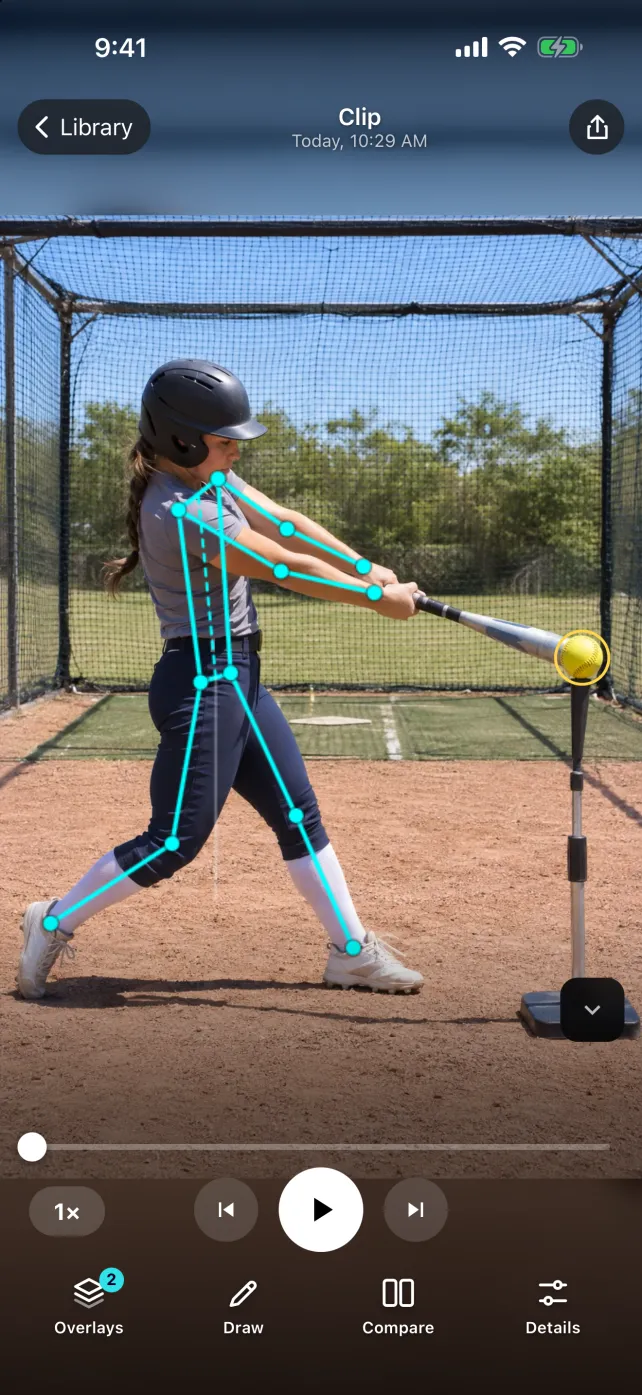
- Turn on body tracking to see the skeleton overlay and joint angles, or ball tracking to see the pitch path.
- Draw a line, circle, arrow or angle at one checkpoint.
- Open a second clip side by side or stacked.
- Add a tag, a note or a voice note, then export a marked frame or clip through the share sheet.
For more detail on each step, read how to analyze a swing video.
What ball tracking shows in softball
Ball tracking draws the visible path of the ball as a trail you can lengthen or shorten. From a steady side view of a pitcher, it shows the pitch path from release toward the plate, so you can see whether two pitches traveled through different parts of the frame. In slowpitch it makes the arc easy to see. Off a tee, it follows the ball after contact while it stays in frame.
It works best with a fixed camera and a clearly visible ball. A yellow ball against a bright sky or a busy fence can be hard to follow. The trail is a picture of the path in the video, not a measure of speed or spin.
Body tracking checkpoints worth a look
The skeleton overlay and joint angles help you point at a body position. They are visual aids, not grades, so check each joint against the video underneath.
- Hitting: head position from stance to contact, front-knee angle at contact, and where the hands are when the front foot lands.
- Windmill pitching: the arm at the top of the circle, the stride foot at landing, and the trunk at release.
Pick one checkpoint per session and ask your coach what it should look like for this player. If a player has pain when hitting or pitching, stop and see a qualified professional.
Compare two reps fairly
A comparison only means something when the camera stays put. Mark the tripod spot with tape, keep the same height and distance, and use the same drill. Line up both clips at the same frame, first visible contact for a swing or release for a pitch, and write what changed in the note. The swing comparison guide walks through it.
Cost and privacy
SportsDraw is $9.99 once, with no subscription, in-app purchases or ads. The subscription apps in our comparison charge about $40 to $100 a year for a solo plan; see the app comparison. Clips stay on your iPhone or iPad, there is no account, and the App Store privacy label is Data Not Collected (how it stays private). With Family Sharing, up to six family members can use one purchase.
What the video shows
SportsDraw shows the swing or pitch frame by frame, with the ball’s path and the body’s positions. It does not measure bat speed, exit velocity, pitch speed or spin. It does not call balls and strikes, keep stats, or tell you what to fix.