
Video review for coaches
SportsDraw lets a coach film, review and send practice video from one iPhone or iPad, with no player accounts and no cloud. It fits a lesson, a cage station or a small-group practice where one person runs the camera.
What SportsDraw does for a coach
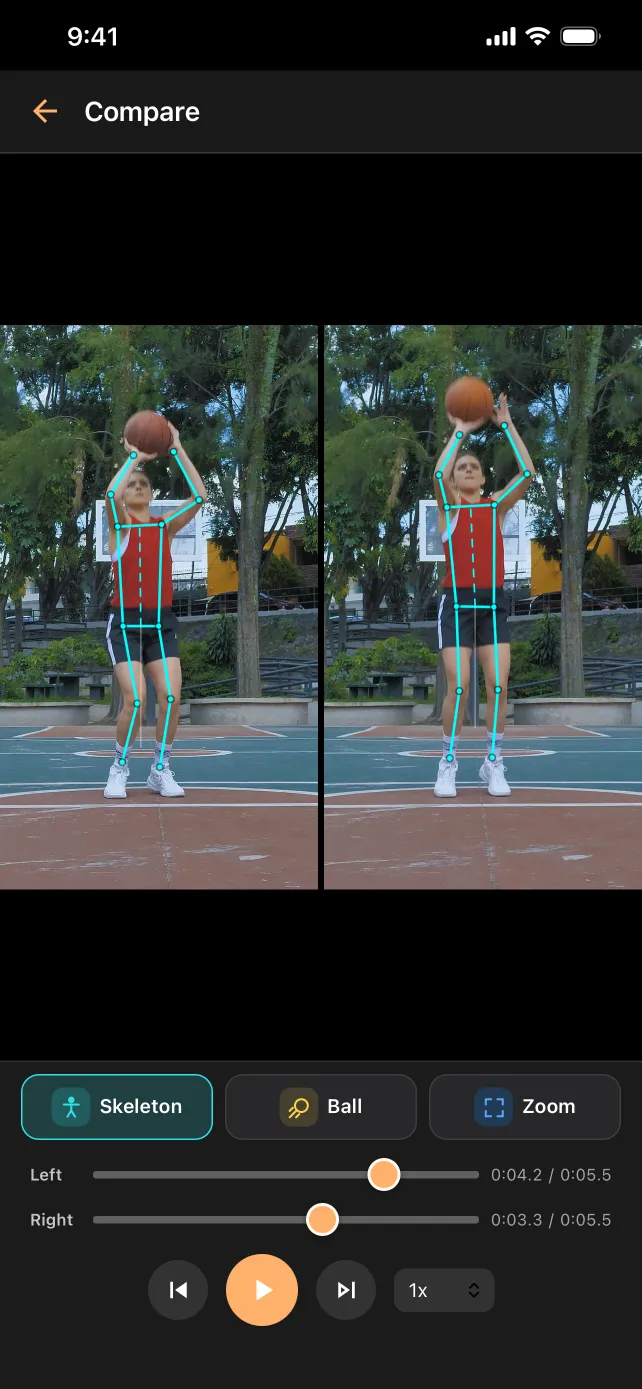
You set up one device, film the rep, and show the athlete what happened before the next one. You can step through the clip, draw on it, turn on ball or body tracking, and put it next to last week's rep. When you want the player or a parent to keep it, you send a marked frame or the clip. They don't need the app to watch it.
Set up one device
Put the iPhone or iPad on a tripod or a fence mount outside the playing lane, behind a net anywhere a ball could reach it. Use landscape for most side views. Put a tape mark where the tripod stands so next week's clips match this week's.
Then record hands-free. In SportsDraw you can set a 3, 5 or 10 second start delay and start or stop with the volume buttons, Camera Control or a Bluetooth remote. That keeps you next to the athlete instead of at the camera. The filming guides for 17 sports give a camera view for each one, and the ball tracking filming guide covers the extra setup that makes a trail readable.
Run a session in SportsDraw
- Record the rep from your fixed spot.
- Replay it at half or quarter speed with the athlete standing next to you, then step frame by frame to the moment that matters.
- Draw one line or angle at that moment. One mark is easier to remember than five.
- Tag the clip with the player's name and the drill.
- Add a note or a voice note with what you asked them to change.
- Open last week's clip side by side or stacked, lined up at the same moment.
- Export a marked frame or clip through the share sheet if the player should keep it.
Example drills that work on video
- Tee work, baseball or softball. Film from the hitter's open side at belt height. Draw a line at the starting head position and step to contact. See the softball swing page for windmill pitching too.
- Free throws. Film from the shooting-hand side. Ball tracking shows the arc, and body tracking gives an elbow angle to compare across reps. The shooting form page has the setup.
- Tennis serve. Film from the side, level with the baseline, with room above the toss. A ball trail makes the toss easy to compare from one serve to the next.
- Pickleball dinks. Film from outside the sideline, a little behind the player, to see the arc over the net.
- Bullpen. Film from the pitcher's open side behind a net and step to the frame where the stride foot lands.
Tag clips by player and drill
The library keeps thumbnails, favorites, tags, notes and voice notes on the device. Tag every clip with the player's name and the drill, so you can pull up one athlete's tee work from three weeks ago in a few taps. Favorite the clip you want to compare against next session. Delete the rest when the session is over.
Send clips to players and parents
Export an annotated photo or video through the iOS share sheet and send it by Messages, Mail, AirDrop (between Apple devices) or any app in the share sheet. The player or parent can watch it on their own phone or computer without SportsDraw or an account. Usually one marked frame and one sentence about the next practice is enough. Here is how to send a video someone can answer quickly.
Video of minors, handled locally
SportsDraw has no player accounts and no cloud. Clips stay on your device, nothing goes to a SportsDraw server, and the App Store privacy label is Data Not Collected. That matters when the athletes are kids.
The app does not replace your own rules. Get parent consent before you film, follow your club or school video policy, frame only the athlete you are working with, and only send a child's clip to that child's family. Read how SportsDraw keeps video private.
What it costs a coach
SportsDraw is $9.99 once, with no subscription, in-app purchases or ads. One purchase covers every iPhone and iPad signed in to the same Apple Account, so a coach can film on a phone and review on an iPad. Family Sharing lets up to six members of your family use one purchase, but it does not cover a team or club, so assistant coaches buy their own copy.
Sharing without accounts
Exported clips are standard video files, so players and parents can watch them on their own phone or computer without the app. SportsDraw has no team roster, cloud library, assignments or messaging. It does not measure speed or spin, keep stats or grade technique, and there is no Android version.