Pickleball Dink Video Analysis: Film Paddle Contact and the Next Bounce
Record a pickleball dink with the paddle, net and next bounce visible. Compare matched feeds, contact and recovery using a practical phone-video review.
Read the filming planA serve clip can show the player's feet perfectly while cutting off the one thing you wanted to study: the toss. Check the full motion before choosing the frame. These views help you collect usable evidence for a coaching conversation without turning a phone angle into a biomechanical diagnosis.
Use a side view for the toss, contact interval and movement into the court, and a separate rear view for lateral placement and target context. Include the entire racket and ball toss. Compare the same serve type and court side, and align clips at contact rather than at the first frame.
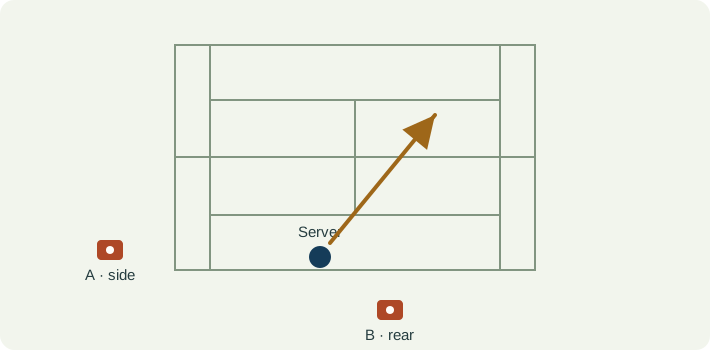
Set the phone outside the court and hitting area, roughly across the baseline from the server. Keep the feet, racket at full reach, toss apex and landing area in frame. Leave extra headroom after watching one complete practice motion.
From behind the baseline and clear of play, show the server and the intended service box. A fixed fence or tripod position makes a later session easier to compare. Avoid placing the lens where a moving player or ball may reach it.
Label deuce or ad side, serve type, target and camera view. Do not compare a side-view flat serve with a rear-view second serve as if only one technical detail changed.
| Event | What to keep visible | Review question |
|---|---|---|
| Toss release | The last visible frame with the ball in the tossing hand and its first separation. | Does release appear in a similar place across the chosen reps? |
| Toss travel | The visible ball positions above the player, including the top of the recorded toss. | Is the ball in frame throughout, or does the crop hide the variation? |
| Contact interval | The racket approaching the ball and the first separate ball frame after the apparent strike. | Is contact actually resolved, or only bracketed by two frames? |
| Recovery | The landing and first recovery movement with both feet visible. | Are you comparing the same intended serve and recovery situation? |
| Observation | Interpretation to check | Next useful action |
|---|---|---|
| The ball exits above the frame | You cannot compare the full toss. | Add headroom and record another ordinary set. |
| The racket is a blurred streak | The contact interval is not clearly resolved. | Use better light and an available slow-motion recording mode; keep an uncertainty note. |
| A side view suggests sideways toss movement | Depth and sideways image movement are mixed by perspective. | Use the separate rear set for that question; keep the views labelled. |
| Two serves reach the player at different moments | The clips were aligned at recording start instead of a shared event. | Align contact, then step backward through the toss. |
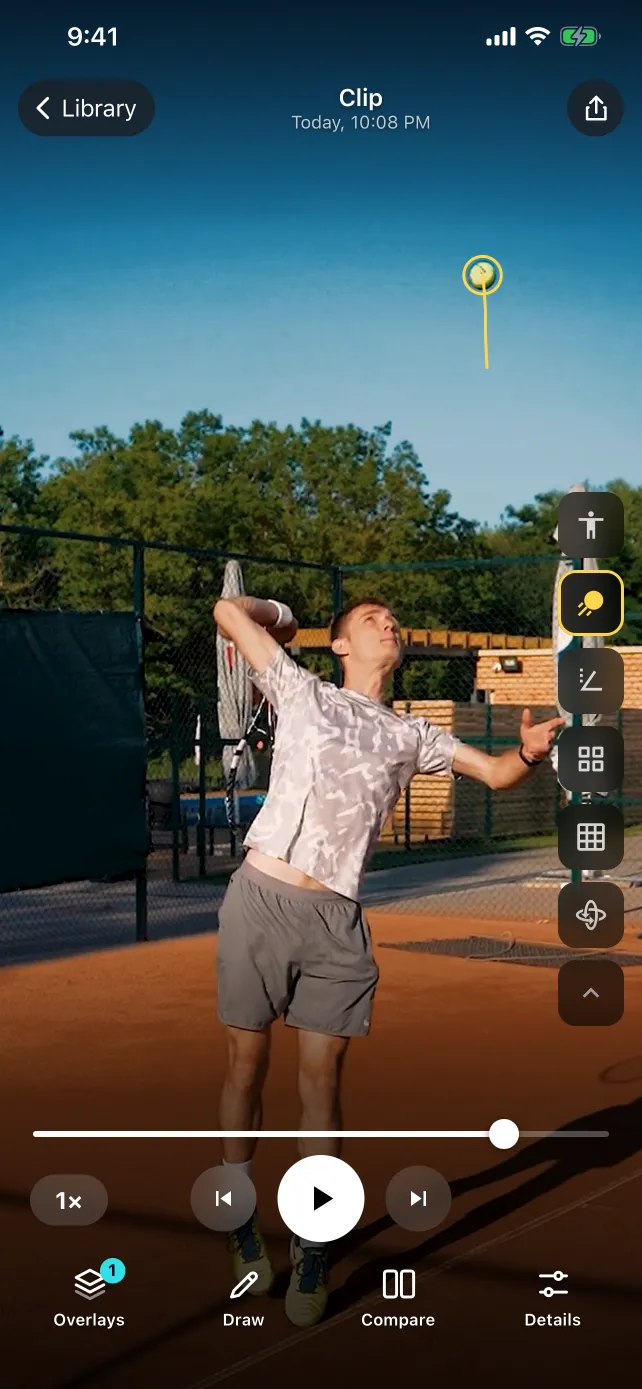
In SportsDraw 1.1.0, step through the toss and bracket contact before adding drawings. A reference line can help compare the same camera view. Use two similarly framed clips in Compare; review the body overlay against the actual shoulders, elbow and feet rather than accepting every joint marker.
Tennis video analysis in SportsDraw · See what SportsDraw can do · See SportsDraw on the App Store
A single two-dimensional view cannot establish a three-dimensional joint angle, racket speed or a cause of pain. An overlay is an estimate and can swap or miss joints behind the racket or arm. A clear contact window supports discussion; it does not produce a professional serve-speed measurement or an automatic coaching verdict.
Slower playback does not add frames that the camera never recorded. If contact is hidden or falls between frames, preserve that uncertainty in your note. See frame timing explained.
https://sportsdraw.app/posts/tennis-serve-video-analysis-camera-angles
This worksheet stays in this page. Copy or print it to keep it; its contents are not sent to us.
Ad side · same target · second serve · rear view · toss visible throughout · align on first post-contact ball frame.
This article is published by the app developer as a filming-and-review workflow. Camera diagrams and example notes are illustrative. They are not athlete test results or an individual coaching assessment. Coaching context was checked against the primary resources below on November 8, 2026.
USTA's coaching resource discusses toss release consistency. The two-view recording and comparison method here is an editorial filming workflow.
Record a pickleball dink with the paddle, net and next bounce visible. Compare matched feeds, contact and recovery using a practical phone-video review.
Read the filming planFilm a volleyball serve with full-body framing and target context. Compare the same serve type, toss, contact interval and recovery on ordinary phone video.
Read the filming planAll sports video-review guides · Baseball and other practice articles