Football Route-Running Video: Review the Stem, Break and Exit
Film a non-contact football route with the full body and break point visible. Compare matched stems, cuts and exits without losing the feet or catch context.
Read the filming planA moving phone can make an ordinary stride look like a change in technique. Different pace, terrain and camera angle also change what you see. Start with a recording that preserves those details, whether you are reviewing a steady run or a planned sprint session.
Use a stable side view of a short, familiar running segment, with the runner’s whole body and a fixed ground reference visible. Compare the same running task and direction at a similar pace. Pause at the same visible stride event before discussing a difference with your coach.
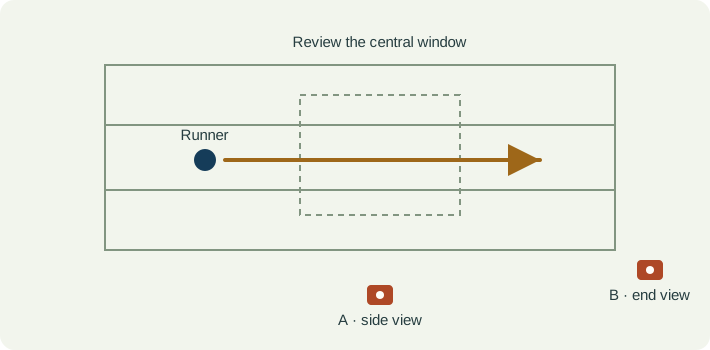
Place the phone outside the running route, approximately side-on to the part of the run you want to review. Keep the support level and retain the head, hands and both feet while the runner passes through the window. Pick a permitted, uncluttered position that does not obstruct other runners.
Note the surface, direction, planned pace and where this clip fits in the session. A standing start, acceleration and steady running are different tasks. Keep the same location and framing between comparable attempts; use a second view only for a second question.
Near and far edges of a wide side-view shot show different perspectives. Choose the central portion where the runner is most nearly side-on. If you follow the runner with a pan, label the clip as moving-camera footage and avoid treating background travel as a measured running speed.
| Event | What to keep visible | Review question |
|---|---|---|
| First visible ground contact | The foot, ground and whole body at the first clearly visible contact. | Is this the same event in both clips, and is the foot actually resolved? |
| Support portion | The sequence between the visible contact and departure. | Can I see the movement continuously, rather than guessing from one paused frame? |
| Foot departure | The last visible contact and first clear separation. | Does the event fall between frames or disappear behind the other leg? |
| Next stride | The following cycle in the same observation window. | Does my observation occur again within comparable footage? |
| Observation | Interpretation to check | Next useful action |
|---|---|---|
| The runner seems to lean more in one clip. | A different view, bend or acceleration phase may explain the appearance. | Match the segment and camera before comparing the visible trunk position. |
| The contact looks longer in slow playback. | Playback speed is not elapsed real time, and the contact boundaries may be unclear. | Keep the source recording and avoid reporting contact time without verified timing and visible boundaries. |
| The second attempt looks faster. | Panning, zoom, pace and camera distance can all change apparent motion. | Record the task context; do not use this visual comparison as a timing gate. |
| The overlay places a foot incorrectly. | Overlap, blur or an obscured ankle may affect the estimate. | Return to the original video and leave the hidden detail unknown. |
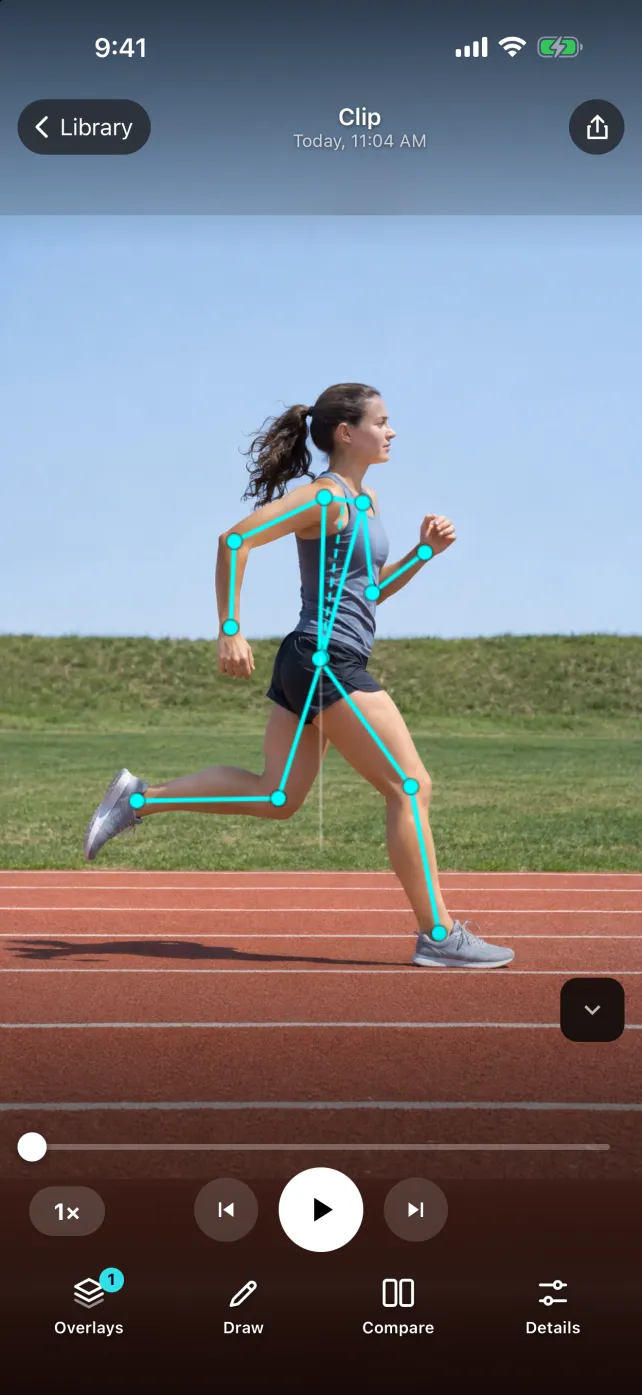
SportsDraw 1.1.0 can be used for manual running-video review: import a clip, slow playback, step through a visible stride event, mark a reference and compare two recordings. Keep pace and session context in the note. This workflow does not claim automatic gait diagnosis, reliable ground-contact timing, stride-length measurement or a prescription to change foot strike.
See what SportsDraw can do · See SportsDraw on the App Store
A single uncalibrated phone view cannot establish three-dimensional movement, ground forces or the cause of pain. Body overlays are estimates of visible landmarks. Historical research using calibrated cameras or additional instruments is not evidence that a phone app reproduces those measurements. Discuss training and technique changes with the appropriate coach; this article is a filming protocol.
Slower playback does not add frames that the camera never recorded. If contact is hidden or falls between frames, preserve that uncertainty in your note. See frame timing explained.
https://sportsdraw.app/posts/running-form-video-analysis-iphone
This worksheet stays in this page. Copy or print it to keep it; its contents are not sent to us.
Same easy-running route and direction, fixed side camera. The central section shows two complete strides in each clip, but a passing runner hides the near ankle once in take B. Observation: that contact boundary is unknown. Next question: can we keep this window clear during the next planned recording?
This article is published by the app developer as a filming-and-review workflow. Camera diagrams and example notes are illustrative. They are not athlete test results or an individual coaching assessment. Coaching context was checked against the primary resources below on November 8, 2026.
Historical primary research context: the project used organised camera recording and additional instrumentation. It is not a validation study of SportsDraw or a source of individual running prescriptions.
Film a non-contact football route with the full body and break point visible. Compare matched stems, cuts and exits without losing the feet or catch context.
Read the filming planChoose the swimming view that can show your question. Compare above-water and underwater footage, label stroke cycles, and save a review note for your coach.
Read the filming planAll sports video-review guides · Baseball and other practice articles