
Soccer Shooting Video Analysis: Film the Strike and Ball Path
Film a soccer shot with the kicking foot, ball and goal visible. Review approach, contact and the early ball path using a repeatable phone-video checklist.
Read the filming planA trail is easiest to interpret when you can see where the movement began and what the ball did next. A shot that starts offscreen, disappears behind a player or becomes a tiny blur can leave the recording unable to support a convincing path, whatever player you use.
Use a steady view that keeps the starting ball, nearby player and relevant travel visible together. Give the ball a readable background and adequate light, and retain the original footage. Check any displayed trail against visible ball positions; a continuous line does not prove that every position was observed.
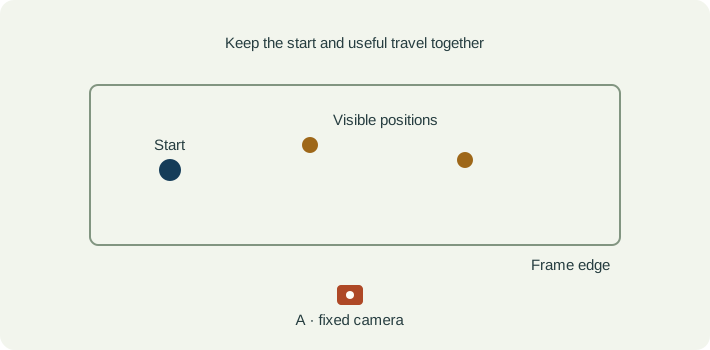
For a familiar soccer finishing practice, for example, frame the approach, kicking foot, starting ball and enough of the target area to understand the attempt. Use a stable support outside the playing lane. Do not follow the ball so tightly that the player and start of the movement disappear.
A wider view retains more progress but can make the ball too small to identify. A tighter view may resolve the initial touch and lose the later path. Choose which portion answers the question, test one ordinary clip, and label any travel that leaves the frame rather than extending a line into unseen space.
Watch the original for shadows, a similar-coloured background, other balls, motion blur and overlap with feet or equipment. Adequate light and a supported capture mode help preserve detail, but a higher frame rate does not remove occlusion. Keep camera and practice setup consistent when comparing recordings.
| Event | What to keep visible | Review question |
|---|---|---|
| Starting identity | The intended ball before it moves. | Can I tell this ball from other balls, markings or reflections? |
| Movement begins | The visible player-ball interaction and first separation. | Is the start recorded, or does the clip begin after the ball has already travelled? |
| Visible path | Several identifiable positions during the relevant travel. | Do displayed trail positions agree with the original ball locations? |
| Interruption or finish | The last reliable position, exit from frame or arrival near the target. | Where does observation stop, and does the note preserve that boundary? |
| Observation | Interpretation to check | Next useful action |
|---|---|---|
| The ball disappears behind a foot or player. | The hidden part was not observed directly. | Check visible positions before and after the overlap; do not claim an exact hidden path. |
| A path starts far from the player. | The recording or selected trail interval may omit the beginning. | Return to the original start and identify what portion of travel is actually shown. |
| The line jumps to another object. | Identity may have changed or a detection may be wrong. | Exclude that output from the observation and retain the clean clip. |
| A longer trail looks more impressive. | Display length changes presentation, not the evidence in the recording. | Choose a useful visible interval and keep the path checked against the source. |
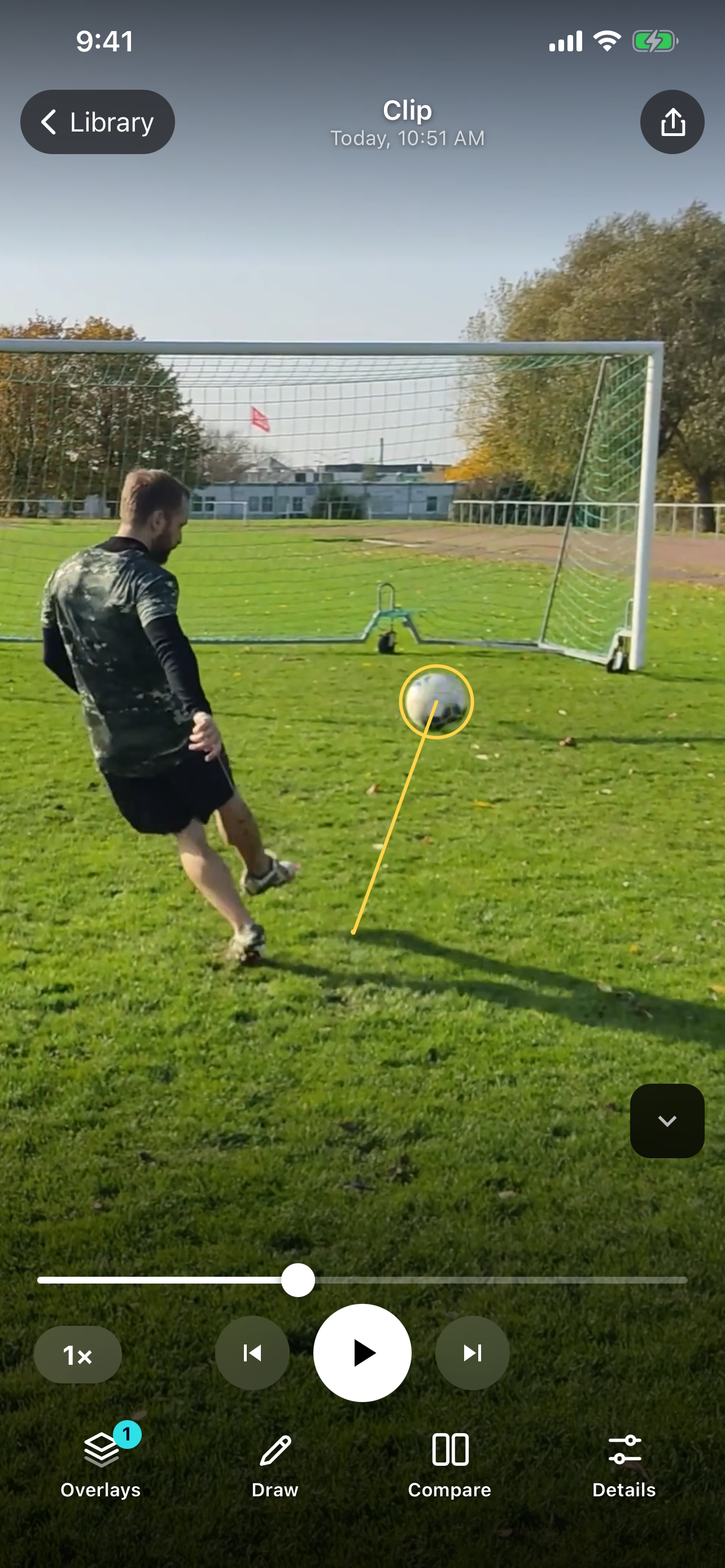
SportsDraw 1.1.0 adds automatic ball tracking with an adjustable trail. In a supported, clearly recorded example, the trail helps you inspect visible travel alongside the player. Use the original frames to check it and adjust display length for the review question. The native soccer example below shows the released app, not a hand-drawn result or a claim of accuracy across every sport.
See what SportsDraw can do · See SportsDraw on the App Store
A displayed trail is not calibrated three-dimensional ball flight, radar speed, spin or an automatic coaching assessment. This guide does not establish support for pucks, shuttlecocks or every small fast ball. Hidden or offscreen travel remains unknown, and a line between visible positions should not be treated as proof of every intermediate location.
Slower playback does not add frames that the camera never recorded. If contact is hidden or falls between frames, preserve that uncertainty in your note. See frame timing explained.
https://sportsdraw.app/posts/how-to-film-ball-tracking-video
This worksheet stays in this page. Copy or print it to keep it; its contents are not sent to us.
Soccer shot, fixed side-oblique view, one ball in the practice area. The original shows the start near the kicking foot and early travel; the ball later becomes too small to identify confidently. Observation: the useful review interval ends before that distant section. Keep the original and discuss the visible start with the coach.
This article is published by the app developer as a filming-and-review workflow. Camera diagrams and example notes are illustrative. They are not athlete test results or an individual coaching assessment. Coaching context was checked against the primary resources below on November 8, 2026.
First-party product capabilities and App Store availability. The native example documents the app display, not a broad accuracy benchmark.
Primary device guidance for supported camera recording controls. Capture options depend on the actual iPhone; playback speed and capture rate remain different things.
Film a soccer shot with the kicking foot, ball and goal visible. Review approach, contact and the early ball path using a repeatable phone-video checklist.
Read the filming planSet up a side-on dribbling clip, keep the full cone lane visible, and compare the touch before a turn, the change of direction and the exit.
Read the filming planAll sports video-review guides · Baseball and other practice articles